
2) Background & Core Concepts
Geotagging uses a phone’s GPS to capture where you are. The app links that location to asset details—name, type, condition, photo, and responsible office. Many such points create a living asset register that planners, engineers, finance teams, auditors, and elected leaders can all see.
Key ideas, explained simply
- Global Positioning System: Satellites help your device calculate an exact position on Earth.
- Coordinates: Latitude & longitude pair that fixes a unique place.
- Metadata: Time of photo, inspector name, asset condition, etc.
- Accuracy: Better in open sky; weaker near tall buildings or dense trees.
- Map layer: Switchable set of points/lines (e.g., all streetlights, natural vegetation).
- Open standards: Common formats so different systems can exchange data.
- Role-based access: Each user sees only what they need.
- Audit trail: Record of who changed what and when.
What a geotagged record usually stores
| Where | Latitude, longitude (sometimes elevation) |
|---|---|
| What | Asset type, name/code, size/material, condition |
| When | Creation/update dates, next service due |
| Who | Responsible department and contact |
| Proof | Photos and notes (e.g., “leak fixed on 7 June”) |
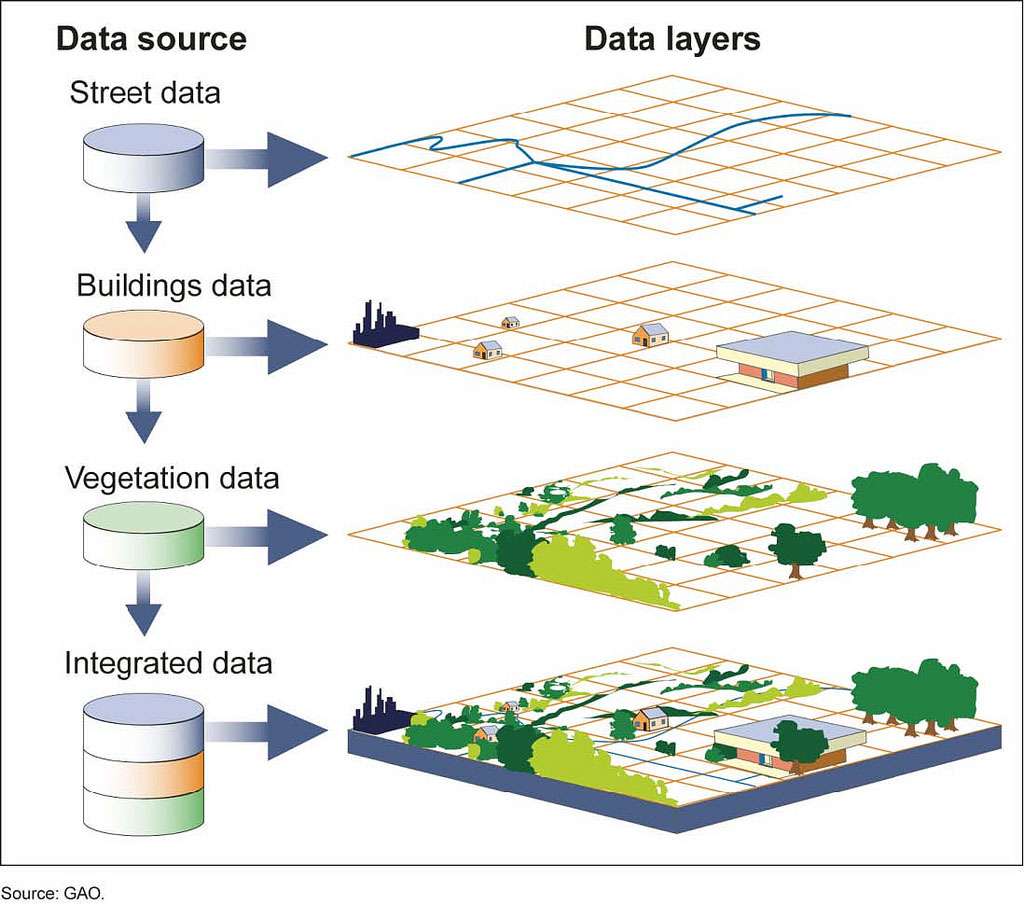
GIS Work Flow
3) Current Uses & Practical Trends
Geotagging is most valuable when it solves daily problems: finding faults faster, planning repairs, and proving that money went to real assets. In elections, mapping polling stations supports logistics, accessibility, and safety checks; in some pilots, linking houses to the nearest station helped rationalise locations and improve field routing.
- Work verification: Confirm that a road, toilet, or tank exists at the claimed spot.
- Maintenance planning: Tag streetlights, pumps, transformers with next service date; auto-create work orders.
- Water & sanitation: Map lines, valves, and plants; find leaks and chokepoints quickly.
- Health & education: Spot facility gaps and plan new sites.
- Disaster risk: Overlay assets on flood or landslide zones; protect critical ones.
- Citizen service: Show nearest public toilet, bus stop, or clinic; accept geo-tagged complaints.
- Finance & audit: Match payments to geotagged progress to cut waste.
- Green assets: Track trees, lakes, wetlands, and storm drains to protect natural buffers.
Plain guide — related tools and when to use them
| Tool | What it does | When to use |
|---|---|---|
| Geotagging | Puts an asset on the map with photos and facts | Building an asset register & day-to-day upkeep |
| Geofencing | Digital boundary that can trigger alerts | No-dumping zones and safety perimeters |
| Remote sensing | Satellite or drone imagery | Large-area change checks; flood mapping |
| Code plate on site | Scannable code fixed on the asset | On-site updates and public fault reports |
4) Benefits & Opportunities
Done well, geotagging changes how offices work. It reduces paperwork, gives leaders a single view of reality, and helps crews fix things faster. For citizens, it builds trust—they can see what exists and report problems with location proof.
- One source of truth: Everyone works off the same live map.
- Faster repairs: Teams know the exact spot, likely spares, and last service date.
- Better budgeting: Real counts of what exists and what works; funds go to real gaps.
- Less leakage: Harder to claim for assets not built or ghost repairs.
- Clear accountability: Named owners, fixed schedules, visible results.
- Public trust: Non-sensitive layers viewable; citizen issue-reporting enabled.
- Local jobs: Survey, data cleaning, maintenance create steady work.
- Smarter planning: Identify service deserts and fix them.
Quick three-month wins
| Streetlights | Geotag with condition & service date; cut dark spots via planned rounds. |
|---|---|
| Public toilets | Geotag; publish cleanliness scores & helpline; fix top complaints first. |
| Water valves | Geotag; design emergency shut-off routes for bursts & floods. |
5) Risks that should be avoided
Geotagging is powerful, but not magic. Without good rules, you can create privacy risks, wrong data, or a dead map that nobody updates.
- Privacy & safety: Restrict sensitive layers; never publish critical locations.
- Data accuracy: Phones can be off by several metres; improve with checks and photo rules.
- False tagging: Counter fakes with time-stamped photos, device checks, random audits.
- Network gaps: Ensure offline capture; sync later.
- Inconsistent formats: Enforce open standards from day one.
- No owner, no update: Name data owners or the map dies.
- Cost & training: Budget for devices, storage, staff time; train hands-on.
- Legal duties: Consent, data minimisation, role-based access, retention & purging.
Note on election use: Election authorities use official apps to map polling stations with coordinates and, in pilots, to relate nearby house locations to stations for rationalisation and field planning. Such work must include strict access control and clear privacy safeguards.
One-line Wrap: Put every asset on the map, protect privacy, keep data fresh—and fix faster.
Mains Practice (150–250 words)
Q1. “Geotagging works best when it drives daily maintenance and public trust, not just pretty maps.” Discuss.
Q2. Draft a one-year city plan to geotag and maintain three asset types (streetlights, public toilets, water valves), while noting election-time use for polling station planning.



Start Yours at Ajmal IAS – with Mentorship StrategyDisciplineClarityResults that Drives Success
Your dream deserves this moment — begin it here.